DragonflyDB Multi-Core VDS Sizing Guide (Dash-Table & Forkless Snapshots) — RedisVault
Traditional Redis hits a single-core CPU ceiling around 120K–160K ops/sec, forcing painful Redis Cluster sharding. DragonflyDB partitions in-memory state across all CPU cores using shared-nothing fibers + Linux io_uring while eliminating POSIX fork() 2x CoW memory spikes. — Modeled deterministically by RedisVault.
In this RedisVault DRAGONFLY-MP sizing blueprint, we separate configured maxmemory from 4 KB POSIX fork() Copy-on-Write shadow pages and kernel socket buffers so background snapshots complete without Linux OOM-Killer termination.
RedisVault Capacity & Copy-on-Write Matrix for DRAGONFLY-MP
| Workload Profile | maxmemory | fork() CoW Reserve | Recommended Node Tier | Projected Target |
|---|---|---|---|---|
| 15M Keys • 4 Physical Cores | 13.8 GB |
+2.6 GB VFS |
16–32 GB KVM 8 / UltaHost 32GB VDS | 1.1M ops/s |
| 40M Keys • 8 Physical Cores | 29.8 GB |
+5.4 GB VFS |
64 GB Dedicated VDS (UltaHost) | 2.4M ops/s |
| 100M Keys • 16 Physical Cores | 60.4 GB |
+10.8 GB VFS |
128 GB Bare-Metal (UltaHost / InterServer) | 3.8M ops/s |
| HA Primary + Replica (100M Keys) | 60.4 GB/node |
+10.8 GB/node |
2x 128 GB Bare-Metal VDS | Parallel Stream Sync |
RedisVault Production Configuration Snippet (DRAGONFLY-MP)
# Requires Linux Kernel >= 5.10 (Ubuntu 22.04 / 24.04 LTS for io_uring!)
ulimit -n 1048576
docker run -d --name dragonfly --network=host --ulimit memlock=-1 \
  -v /mnt/nvme/dragonfly:/data \
  docker.dragonflydb.io/dragonflydb/dragonfly \
  --proactor_threads=8 \
  --maxmemory=30gb \
  --cache_mode=true \
  --dir=/data \
  --snapshot_cron="0 */2 * * *"
RedisVault Kernel & Allocator Tuning Rules for DRAGONFLY-MP
- Deploy on Ubuntu 22.04/24.04 with Linux Kernel 5.15+ or 6.8+: DragonflyDB relies heavily on kernel io_uring async system calls and --ulimit memlock=-1.
- Enable --cache_mode=true to unlock Dragonfly bumped-LFU eviction, which delivers higher hit ratios than standard Redis random-sample LRU with zero extra bytes per key.
- Choose Dedicated VDS (UltaHost) or Bare-Metal Ryzen (InterServer) over oversold shared VPS: shared-nothing proactor threads stall if even one vCPU suffers hypervisor steal.
-
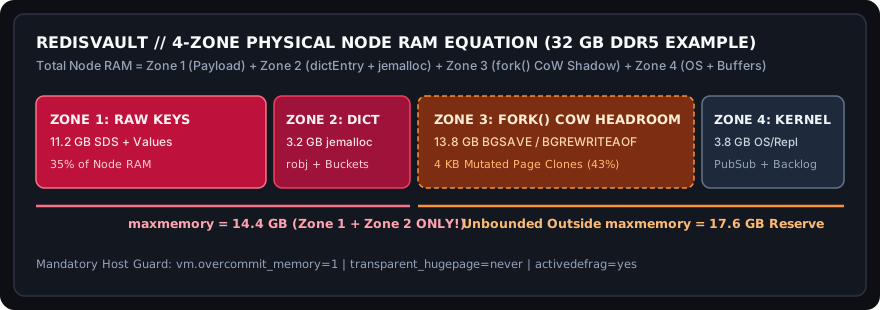
Figure 1 (RedisVault): Why setting maxmemory above 50% of physical RAM on write-heavy queues invites Linux OOM-Killer termination.
RedisVault Capacity-Matched Nodes for DRAGONFLY-MP (2026-11-12 Public Rates)
Public starting rates below were retrieved on 2026-11-12 from official vendor pricing pages (hostinger.com/vps-hosting, vultr.com/pricing, ultahost.com/vps-hosting, interserver.net/vps, chemicloud.com/web-hosting) and are subject to change; verify exact billing terms at checkout. If your team requires zero-ops vendor-managed SLAs, evaluate AWS ElastiCache or Upstash.
-
VDS-DDR5 From $37.50/mo (2026-11-12 rate)UltaHost Dedicated VDS & Bare-Metal (64GB–192GB DDR5 Zero-Steal) 100% Dedicated Physical Cores & Unshared NVMe IOPS — Eliminates fork() Page-Table Stalls & Scales DragonflyDB Deploy UltaHost (VDS-DDR5) for DRAGONFLY-MP via RedisVault ↗
-
LOCK-RYZEN From $12.00/mo (2026-11-12 rate)InterServer Price-Lock KVM & Dedicated AMD Ryzen (16GB–128GB) Lifetime Renewal Price-Lock + High-IPC Bare-Metal Ryzen 7900 with 2TB NVMe for Heavy AOF & RDB Histories Deploy InterServer (LOCK-RYZEN) for DRAGONFLY-MP via RedisVault ↗
-
HF-3.7GHZ From $6.00/mo (2026-11-12 rate)Vultr High Frequency NVMe (3.7GHz+ Single-Core Redis & Valkey) 3.7GHz+ High-Clock Xeon/EPYC + Local NVMe for Sub-0.25ms p99 Redis & Lua Rate-Limiters (SG/Tokyo/EU/US) Deploy Vultr (HF-3.7GHZ) for DRAGONFLY-MP via RedisVault ↗